Showing posts with label variable expense. Show all posts

Monday, February 7, 2011

What Rewards Card Do You Recommend?

One of my goals is to get a rewards credit card. For the sake of my own sanity, I've made an effort to pay my credit card balance in full each month (I'm going two months strong!). Since I'm getting more comfortable with this habit, I've decided that it's appropriate for me to start shopping around for various cards. These are the card attributes that I've decided are important:
  • No annual fee
  • No monthly maintenance fees (in fact, no stupid fees that are assessed, even if I elect not to use the card)
  • Every purchase qualifies for points (none of that fancy stuff with "select merchants" or restrictions to entertainment or dining expenses)
  • Points/rewards/miles don't expire
  • I can use points/rewards/miles on any travel purchase (any airline, car rental company or hotel) without blackout dates.
Given these requirements, I've been considering Blue Sky from American Express, Venture Rewards from Capital One, Miles by Discover, and Chase's Sapphire card.
I realize that a couple of the cards waive the annual fee for the first year (one version of the Venture Rewards card and the Chase Sapphire card, specifically), but I'm confident that I'd be able to negotiate waiving the fee in subsequent years.

I've been on credit card comparison sites such as CreditCards.com, BankRate.com, CardRatings.com and even Google's credit card reviewer, and I'm still undecided.

The APR (annual percentage rate=the cost of using other people's money) and late payment fees are not important to me, as I will continue to pay my balance in full each month (no finance charges here and I ain't the one to go jacking up my credit score with late payments). Moreover, I will use this new credit card for regular purchases: food, gas, my phone bill, and miscellaneous expenses (ex: cat stuff, airfare, entertainment).

Do you have any of the above-mentioned credit cards? Have you thought about getting a rewards card recently? What have been your experiences? What advice would you offer as I make this decision?

Thursday, January 27, 2011

This Phone Bill Can't Be Right

I am a satisfied customer of AT&T. I don't have a "fancy phone" with internet access and whatnot (at least for now :>). I have a plan with just enough minutes (I have plenty that have "rolled over") and unlimited text messages. The base price for my rate plan is $59.99 ($39.99 for the minutes and $20 for unlimited text messages). I've gotten accustomed to paying just under $70 a month for my phone bill (including taxes, fees, and the occasional usage charge for when I accidentally access the internet<<those data charges suck!) However, I've noticed that my most recent bills have been $71+. 


At first, I thought I was accidentally accessing the internet more often than usual. Turns out, one of the miscellaneous fees has increased. Now you might say, "what the heck is your problem? It's just a couple of dollars." Well, I believe it "all adds up." Besides, I'm irritated that my monthly spending plans reflect a $70 expense for something that turns out to be a little bit more. At the current rate (approx. $71/month), I'm spending $12 to $24 more (per year) on my phone than planned!

Okay, so maybe I'm being a bit dramatic. You know what I did? I changed my billing address to my parents home (heck, I have their address on file for other accounts, so what's the big deal?). My hope is that the local fees for their city/county/state will be lower than the local fees for my city/county/state. I'm crossing my fingers I can go back to paying $69.82/month (or less). I'll keep you posted!

Would you change your billing address on an account if it meant paying lower taxes and/or fees? Why or why not?

P.S. I recently signed up for auto-pay on this account. I guess it took me so long because I have a thing with control and desire to move money when I want to. ..and this auto-pay plan doesn't allow you to set the payment date. Most importantly, I wanted to make sure that I'd have the funds available to cover the expense, as I assign certain expenses to the 1st or 2nd pay period of the month. However, I've been bought... there was a $10 incentive to switch to auto-pay or paperless billing (I did this eons ago). So I'm just waiting on my ten bucks! I'll probably ask you what to spend it on ;)

Thursday, November 4, 2010

This is What I Do

For as long as I can remember, PF geeks/fans/experts have encouraged the use of a budget. In helping people understand how to create a budget, much of their advice directs folks to track their expenses (i.e. categorize and write down everything you spend) for a month, and then use such numbers as a basis for your budget (i.e. the month to month plan for spending your money). My major beef with this technique is that one month of expenses (and income) doesn't look like every other month of the year. Sure, I have fixed expenses and variable expenses to look forward to every month, but how do I accurately plan for the miscellaneous expenses? And how do I remind myself of my progress (i.e. spending within my income and setting aside funds for goals)? 

I track ALL the time. Yup. That's what I do. Moreover, I take a summary of my expenses and average it with previous pay periods (that's how I break down my expense tracking; as per my regular paycheck). Next year, I look forward to tracking on a monthly basis. To give you an idea of how this budget/tracker tool works, I've included a blank copy here. I encourage you to use it if 1) you're not currently tracking your expenses/budget or 2) what you're using isn't working for you. I'd love to hear your feedback. But before we get started, here are a few assumptions:
  • You have a bank checking account that you regularly use for transactions.
  • You have stable income (i.e. you know how much you get paid for each month)
Okay, here's your guide:

1st Tab, Annual Budget: In general, this is what your month-to-month expenses look like. Simply insert the monthly expense and the spreadsheet will calculate your annual expense for said category. Your total annual expense should be equal to or less than your regular annual income. For the folks who work on commission and have widely varying income, you could estimate the lower end of your anticipated income...or use a tool that's better suited for you.

2nd Tab, "Insert Month Here": This is where you will track your expenses. Feel free to change the name of the tab for the month that you will be tracking expenses. Enter your regular monthly income in cell M3 (it has a little orange ticker in the cell for a comment box). The reason this is here is so your expenses can be deducted from it to show you what you have available to spend. I often check this number against my bank statements. If you have additional income during a specific month, you can add it to your regular income; remember to add a note about the amount and source of those extra funds (ex: tax refund, $3269.11; overtime, $563.97).

For the "date" column, type in the date that you make a purchase (ex: 11/04). For the "Description" column, type in what you purchased and any details you'd like (ex: Publix (groceries), PetSmart (toys), TGIFs (+$10 tip). If you run out of space for the details you deem critical, simply "insert a comment" to add additional notes. Now, enter the amount that you spent at the respective store/on the respective item in the appropriate column. For example, if I spent $56.93 at Publix, I would enter that dollar amount in the food column. Likewise, if I spent $46.36 at TGIF, I would enter that dollar amount in the food column. Now, if I used my credit card to make a purchase at TGIF, I would not enter it into the food column, I'd enter the amount spent in the "CC Transactions" column. Similarly, if you use cash, track all of your cash transactions in the appropriate columns. If my categories of spending don't work for you, change them!

3rd Tab, Summary of Expenses: This is pretty straightforward. Enter the total spending per category per month in the appropriate line. Put another way, copy the amounts from row 4 of your "Month" sheet to the corresponding month in the summary sheet. This last sheet will average out what you spend per category of spending (ex. food, entertainment, bills, etc.). You can then compare these amounts to your annual budget to explore opportunities for improvement.

Since using this budget tracker - about 2 years, now - I've gained an incredible sense of control over my finances. I can project where I will pull money from to make up for other expenses, keep an eye on how much I'm spending, and remain mindful about credit card transactions. I hope it is equally helpful for you!

Monday, October 25, 2010

7 Days and 1,604.85 Dollars Later...

Last week, I posted "Decisions, decisions, decisions..." to reflect the conundrum du jour: should I use my "extra" paycheck for a trip to Houston or do other stuff with it?

Well, it took me less than a week to blow through more than my "extra" check. Here's how I did it:
  • $717.73 for bills ($689.01 for my car payment and $28.72 to pay off my credit card balance)
  • $255.64 for "other" or miscellaneous expenses (stamps, airfare, brake lights (the DIY replacement of $6.35 is much less than the $29.99 the rotor-replacers wanted to charge...more on them, next), pet food, public transportation fare).
  • $250.10 (on a credit card) for an unexpected car repair.
    • I had my coupon ready to go for my oil change, but after a road test (something that I insisted be done because I've been hearing squeaking while braking), I was informed that my front brake rotors needed to be replaced. Unfortunately, they were worn down to the point that resurfacing them (a cheaper alternative to rotor replacement) was not a feasible alternative.
  • $197.63 for food (sadly, more than half of this was spent on eating out, including this little indulgence).
  • $71.43 for gasoline.
  • $60 for an ATM withdrawal ($49.72 was spent on a day trip to NYC - tolls and food- and state park admission for a "hiking" trip in a part of the Appalachian Mountain range. I spent another $6 as a tip for lunch that I didn't pay for.) Sadly, I can't account for the outstanding $4.28.
  • $39.53 for savings (I wanted to make the amount in my ING Direct account an even number. Lame. I know).
  • $12.79 for a bottle of vino (yes, liquor has it's own category in my spending plan). Don't judge me ;)
All said and done, I will have $34.26 left over from this "extra" check. None of which, I might add, went towards a trip to Houston. I should mention, however, that part of the airfare cost listed in the miscellaneous category includes a membership fee for Spirit Airline's "$9 Fare Club." This service, at approximately $60, will pay for itself over the purchase of two airline tickets (one down, one more to go) as I will receive special fares for being a member ($19 one way ticket to travel 900+ miles, anyone?)

I know this isn't the most impressive record of spending "fun" money, but tell me, WHAT WOULD YOU HAVE DONE?

I guess I don't have "money to blow".....

 
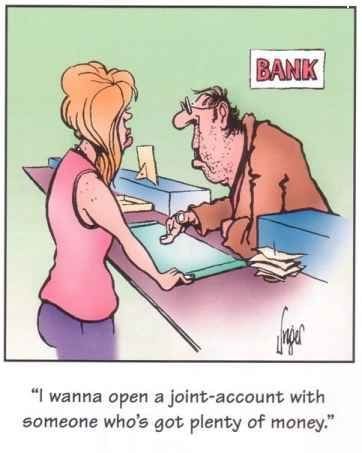
From Candy Slice Comedy

Thursday, September 16, 2010

It's My Budget! Part 2 of 3


Earlier this week, I shared my budget and categories of spending that were non-negotiable.

Today we will cover the part of my budget where I have a little flexibility: meet my “maybe negotiable” expenses.


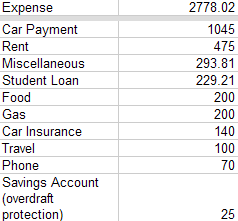
I spend $565 in “maybe negotiable” categories each month. Here they are:

Food, $200: While I’ve never been one to order out “every day of the week”, I do enjoy an occasional indulgence such as happy hour or a $7 slice of cake (Hey, don’t judge me! We both know that Cheesecake Factory has it going on!). I recently discovered that I could shave about $40 off of my food expenses if I remained diligent about packing my lunch and not eating out “so much” (ex. twice a week). When it comes to grocery shopping, I make a list based on what’s in the sale circular. I haven’t been a super-duper-coupon-clipping-lady when it comes to food shopping, so there might be an opportunity here. By the way, I can get down like Cookie Monster...


Gas, $200: Currently, carpooling and public transit are not feasible options for my day-to-day travel because: a) my job requires that I have my own transportation (luckily, I don’t have to travel out of the office everyday; but when I do, I am reimbursed for it), and b) although I live 40 miles away from the J-O-B, there is no direct route (via mass transit) from where I am to where I need to be. I’d have to drive at least three-quarters of the way or take fifty million transfers to get to work (okay, so 50,000,000 transfers is a bit of an exaggeration).


Car Insurance: $140: I could pay the entire premium out of my savings (and eliminate the inconvenient “convenience fee” tacked on for monthly payments), break my premium into larger chunks (ex. pay it over the course of 2 or 3 months vs. monthly), or do what I’m doing (pay in monthly installments and spend $25 over the course of 5 months to pay the entire amount. I should mention that 1/6 of my car insurance premium is less than $140 I currently pay; at the rate I’m going, I’ll pay the entire premium in less than 6 months.


Savings Account, $25: Not too long ago, I was familiar with overdraft fees in a way that’s embarrassing to admit to. In order to mitigate this issue, I signed up for overdraft protection with my primary bank. To avoid monthly maintenance fees on the savings account where the overdraft service pulls from, I have to maintain a monthly deposit of at least $25. Staying on top of my account balances and outstanding transactions has resulted in ZERO overdraft fees for me (YAY!). In fact, the last time I incurred such a fee was April 2009 ($245 of overdraft fees in that month alone; you better believe that I signed up for overdraft protection the following month. I was absolutely disgusted by my waste and irresponsibility!)